

PHOTO MANAGER
ITB PHOTO
A free Windows app that sorts out a mess of photos: point it at your folders and it lays every photo out by date taken, groups them by year, month, folder and camera, finds exact and similar duplicates, and moves the photos you select into folders or deletes them. Photos kept only in OneDrive stay in the cloud: the app gets their thumbnails from OneDrive, so it works for libraries of terabytes too. You can also search by content: describe what is in the photo, for example "car by the house" or "document", and the app finds it.
VERSION 0.3.0
WINDOWS 10 / 11 · 64-BIT
UPDATESAUTOMATIC
INSTALLER
NO INSTALL
The installer installs ITB Photo for your account (no administrator rights needed) and .NET 10 if it is missing. The installed app updates itself.
- 333a56935bc50dfe1a59082bdbf848504524bb543648d3210d490d1e8b4cba7fITBPhoto-0.3.0-win-Setup.exe
- 4cb2df329e3435f8fc39502fa494d3c8fa3d54795c67eca1c3735e625babf68bITBPhoto-0.3.0-win-Portable.zip
THE APP
What ITB Photo looks like
The screenshots show a demo library of generated pictures.
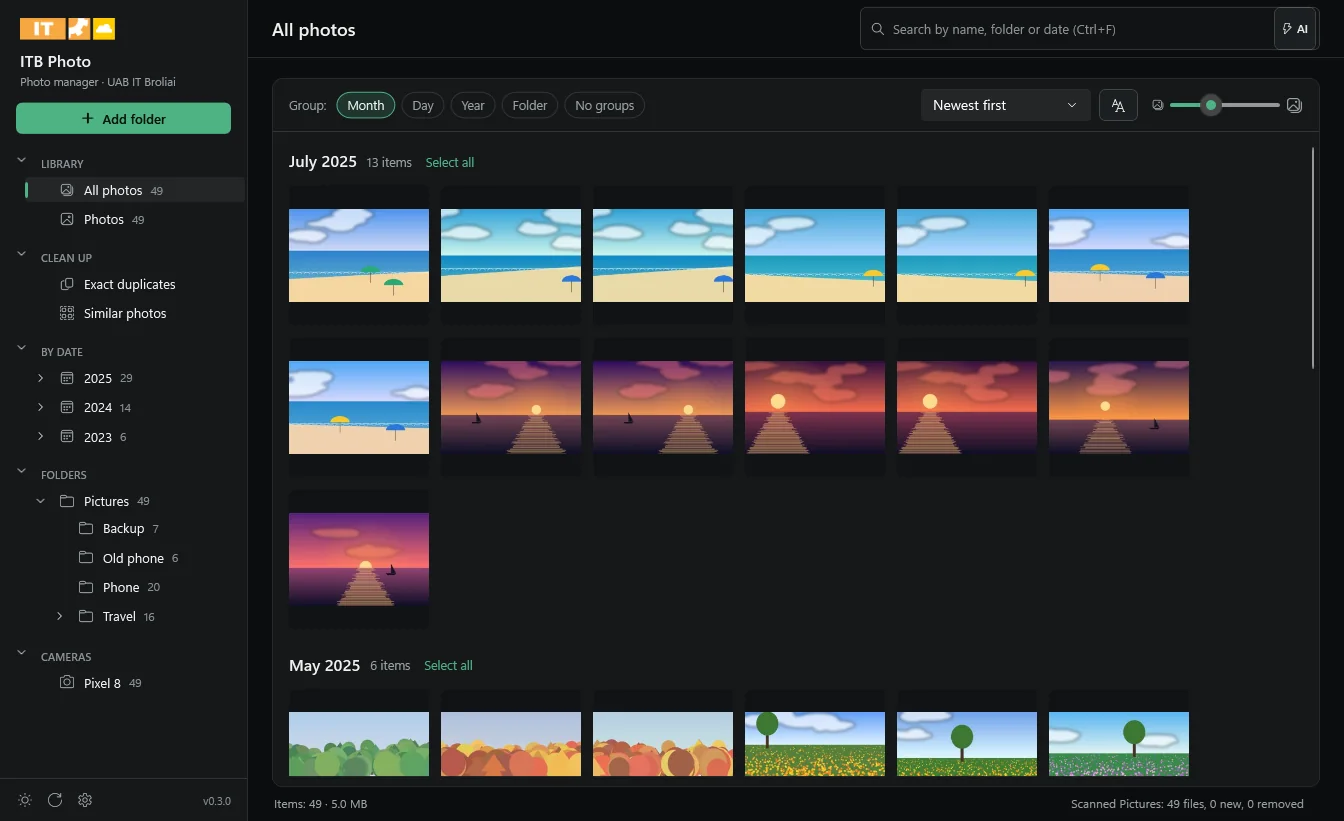
ITB PHOTO 0.3.0
All photos by date taken
On the left the app groups the library by itself: kinds of photos, clean-up, years and months, the folder tree and cameras. In the middle, every photo by date taken.
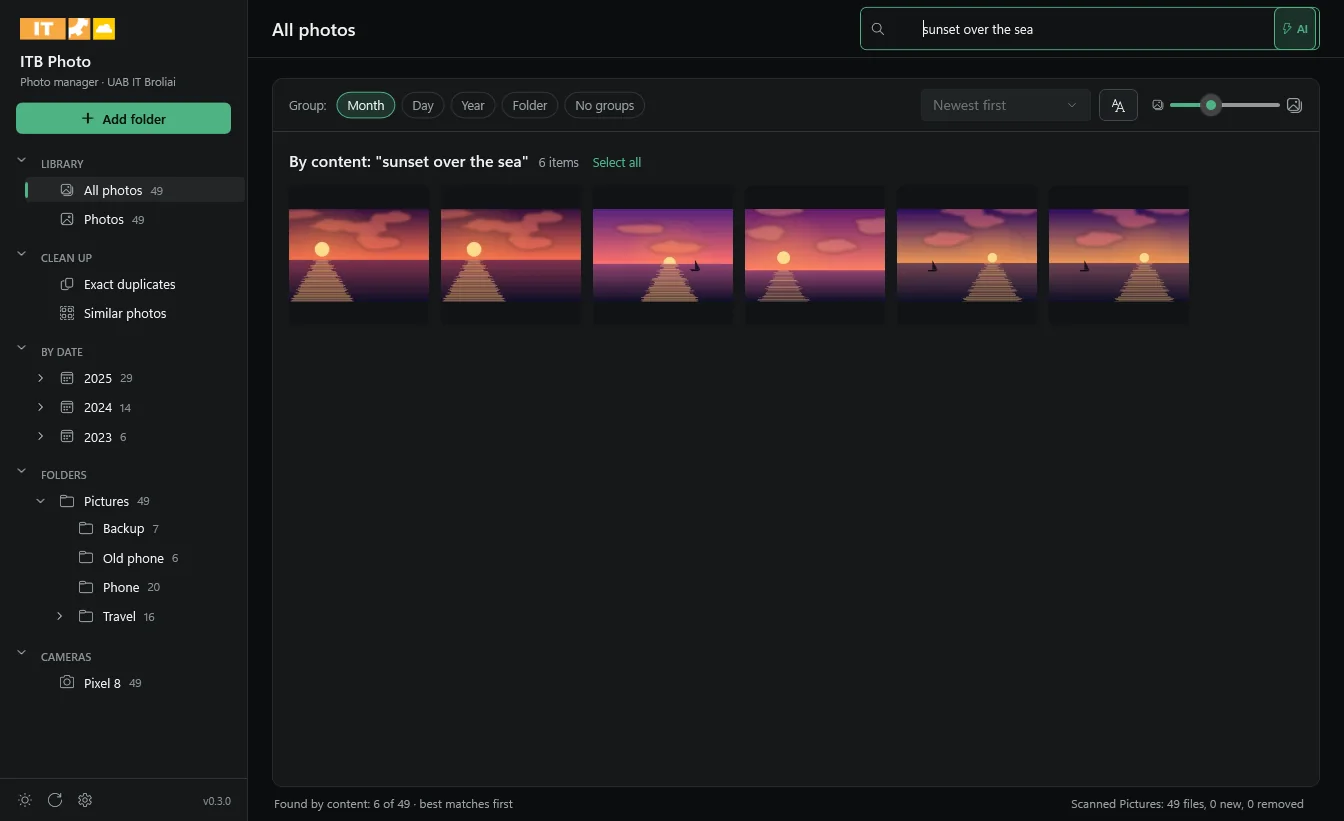
ITB PHOTO 0.3.0
AI content search
Turn on "AI" and describe the photo. A search for "sunset over the sea" finds the sunsets, though no file name says so.
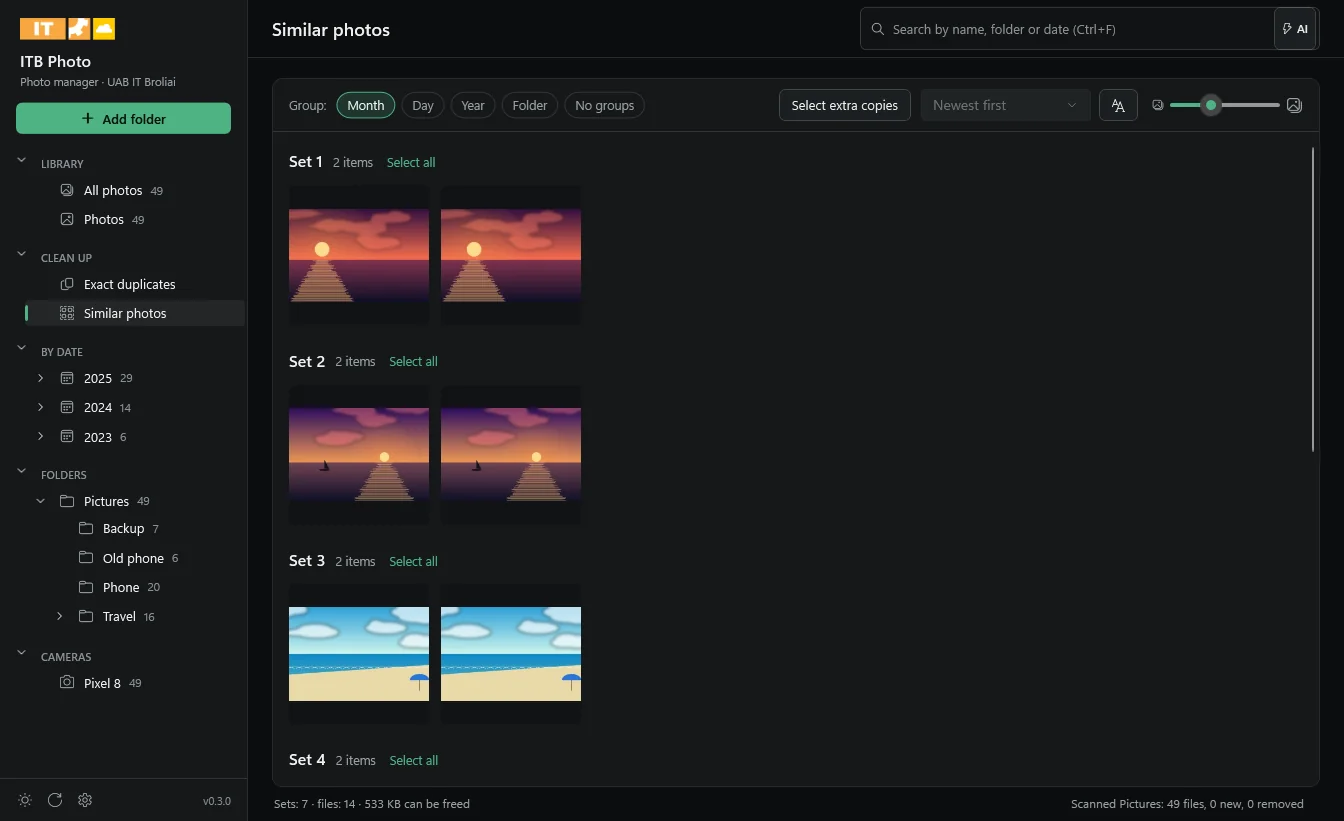
ITB PHOTO 0.3.0
Duplicates and similar photos
Identical and resized copies are put into sets. "Select extra copies" keeps the best copy in every set and selects the rest.
FEATURES
What ITB Photo does
Everything by date taken. The date comes from the photo (EXIF), or else from the file name (such as IMG_20190504_123456, WhatsApp, iOS) or the file time. Photos without a real date are shown apart.
Automatic groups on the left. All photos, photos, videos, RAW, screenshots, online-only files, years and months, the folder tree and cameras, with counts.
OneDrive without downloading. Thumbnails come from OneDrive the way File Explorer shows them, so files kept only in the cloud stay there. It works when the library takes terabytes, too.
Exact duplicates. Identical files are found by size and content. When a copy is only in the cloud, it is compared by its picture, with nothing downloaded.
Similar photos. Resized, re-saved or recompressed copies of the same photo. One button keeps the best copy in every set and selects the others.
Moving into folders. Moves the selected photos to a folder of your choice, into subfolders by year, month or day if you like. Existing files are never overwritten.
Safe delete. Deleted files go to the Recycle Bin (OneDrive files to the OneDrive recycle bin), and the app warns when every copy in a set is selected.
Quick to open. The index and thumbnail cache stay on your computer, so a library you have opened before appears at once, and the photos on screen always load first.
AI content search. Describe in your own words what is in the photo ("car by the house", "document") and the app finds the photos that match. Understands English, Lithuanian and about 50 other languages. The model (about 490 MB) is downloaded from Settings only if you want it and runs on your computer: no photo is sent anywhere.
English and Lithuanian. The interface follows the Windows language, and you can change it in Settings.
Updates itself. A new version downloads in the background and installs when you close the app or click "Restart".
WHAT'S NEW
Release notes
Version 0.3.0 · 2026-11-13
- English interface: the language follows Windows and can be changed in Settings.
- The status bar shows the folder's name instead of its whole path.
Version 0.2.0 · 2026-11-13
- AI content search: turn on "AI" in the search box and describe the photo, in English, Lithuanian or about 50 other languages.
- Settings window: download the AI model (about 490 MB) when you want it, and remove it any time.
- Photos are analysed in the background from the thumbnails already made, so OneDrive files are not downloaded. Search works while the analysis runs.
Version 0.1.0 · 2026-11-13
- First version: library, grouping by date taken, folder and camera, search by name and date.
- Exact duplicates and similar photos, moving into folders by date, safe delete to the Recycle Bin.
- OneDrive thumbnails without downloading, dark and light themes, automatic updates.
VERSION 0.3.0 · 2026-11-13
Requirements
- Windows 10 or Windows 11, 64-bit.
- .NET 10 Desktop Runtime: the installer installs it if it is missing.
- No administrator rights: the app installs for your account.
- For OneDrive photos: OneDrive installed and signed in, with Files On-Demand turned on.
- For AI search (optional): about 500 MB of free space for the model and an internet connection to download it. Analysis runs on the processor; no graphics card is needed.
FAQ
Frequently asked questions
Does the app download my OneDrive photos?
No. While indexing, making thumbnails and looking for duplicates the app never opens files kept only in the cloud, so they stay there. A file is downloaded only when you open it or move it out of its OneDrive folder, and the app tells you beforehand how much will be downloaded.
Why do some OneDrive photos show an approximate date?
OneDrive does not provide the date taken for files that are not downloaded. The date then comes from the file name or the file time, and those photos are listed under "No date taken". Once a file is downloaded, the app reads its real date by itself.
How does the app tell similar photos from different ones?
Every photo gets a small grey "fingerprint". Candidates are picked by picture, date taken and content, and then the fingerprints must nearly match. That finds resized and re-saved copies without mixing up different photos of the same place.
Does the app delete anything by itself?
No. Nothing is deleted or moved without you. Deleted files go to the Recycle Bin, so you can restore them.
How does the app update?
When it starts, the app checks itbroliai.lt for a newer version and downloads it in the background. "Update is ready" then appears at the bottom: click "Restart" to update at once, or it updates when you close the app.
How do I turn on AI content search?
Click the gear at the bottom left of the app and choose "Download the model" under "AI content search". The app then analyses your photos in the background, and an "AI" button appears in the search box. Turn it on and type what you are looking for, such as "children on the beach" or "crashed car". The best matches come first.
Does AI search send my photos to the internet?
No. The model is downloaded once and runs on your computer; photos and search words are not sent anywhere. The analysis uses the thumbnails already made, so online-only OneDrive photos stay in the cloud. You can remove the model in Settings at any time; the analysis already done is kept.
How long does the AI analysis take?
About 15 to 20 photos a second on an ordinary computer, so about 10 minutes for 10,000 photos. It runs in the background at low priority, the app works as usual, and search already uses what has been analysed.
How do I change the language?
Click the gear at the bottom left of the app and pick "English" or "Lietuvių" under "Language". The app restarts in that language.
Why does Windows warn me when I run the installer?
The app is not digitally signed yet, so Windows SmartScreen may show a warning. Click "More info" and then "Run anyway". You can check the downloaded file against the SHA-256 checksum on this page.
How do I uninstall the app?
In Windows Settings → Apps → Installed apps, pick ITB Photo and Uninstall. Your photos stay where they are; only the app is removed.