

VISIO FILE VIEWER
ITB VISIO VIEWER
A free Windows app that opens Microsoft Visio drawings without Visio: old .vsd files (Visio 2000-2010), .vdx XML files and current .vsdx files (Visio 2013 and later). You can zoom in, turn the pages, click a shape to see its data, search the text, save a page as a picture or print it. Drawings are read on your computer only, and the app keeps itself up to date.
VERSION 0.2.0
WINDOWS 10 / 11 · .NET FRAMEWORK 4.8
UPDATESAUTOMATIC
INSTALLER
NO INSTALL
The installer sets up ITB Visio Viewer for your account only, without administrator rights, adds shortcuts and puts the app in Open with for Visio files. You can also extract the ZIP anywhere and run it without installing.
- 07fcd3120209118b2ce268c65be3742cc1a71a96b087dc6d2227bf3e9a216cffITBVisioViewer-0.2.0-win-Setup.exe
- 57f7fae9ceaaae1b5654aaed721e960cf8010c1619f5eef0bc5e70d5d06d8f78ITBVisioViewer-0.2.0-win-Portable.zip
SCREENSHOTS
What the app looks like
The screenshots show a demo drawing, and all the data in it is made up.
ITB VISIO VIEWER 0.2.0
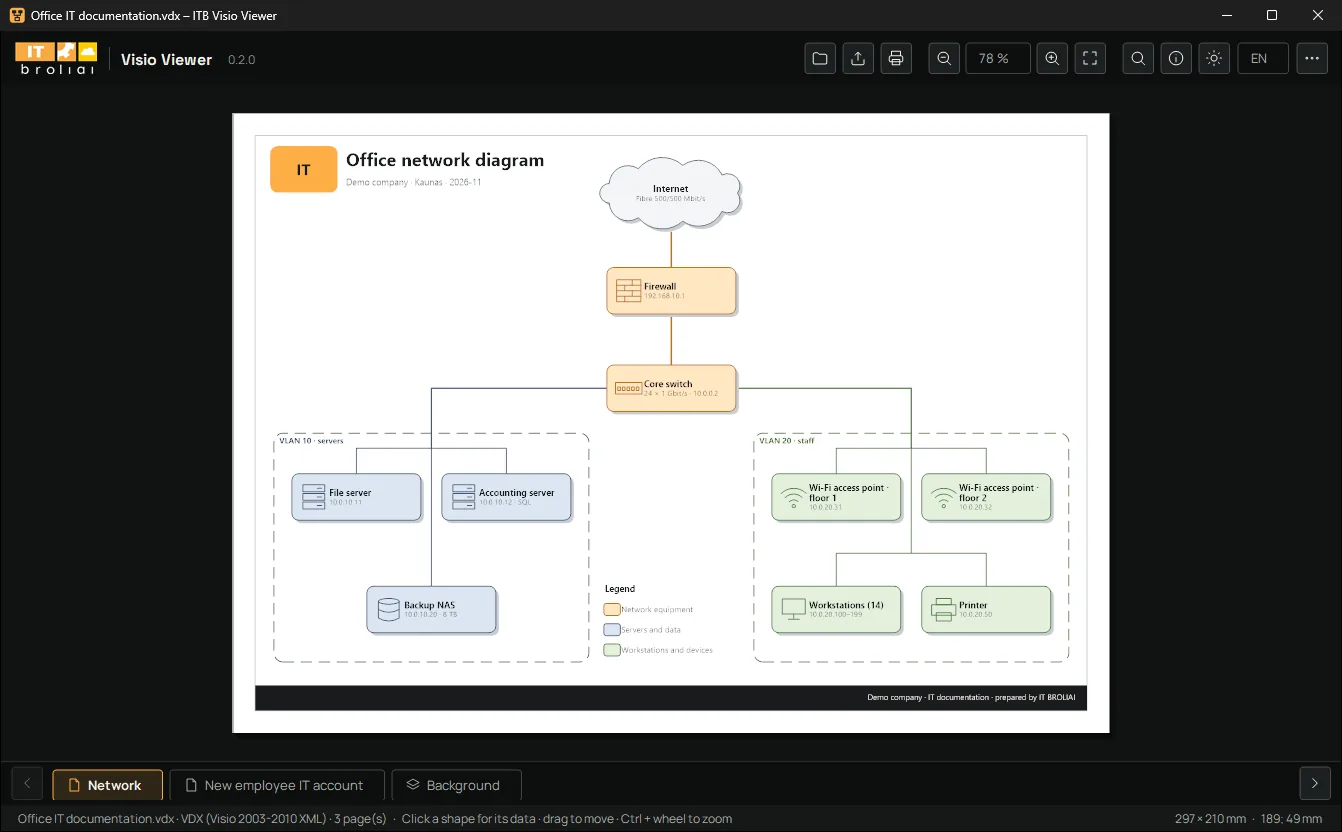
A network diagram in the viewer
An open .vdx drawing with a background page: devices, links, VLAN zones and a legend. Pages sit as tabs at the bottom of the window.
ITB VISIO VIEWER 0.2.0
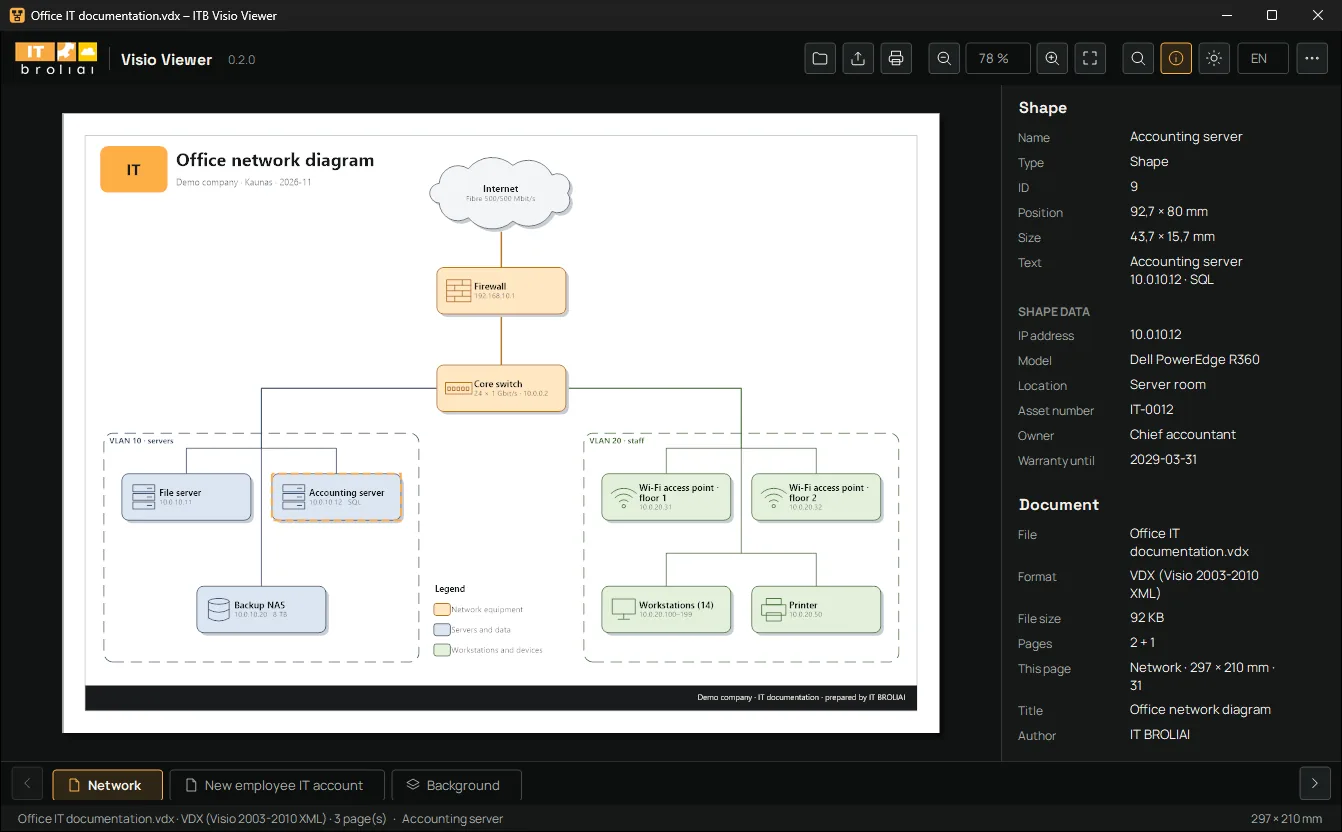
Shape data
Click the server and the right-hand panel shows its IP address, model, location, asset number and owner, with the document details below.
ITB VISIO VIEWER 0.2.0
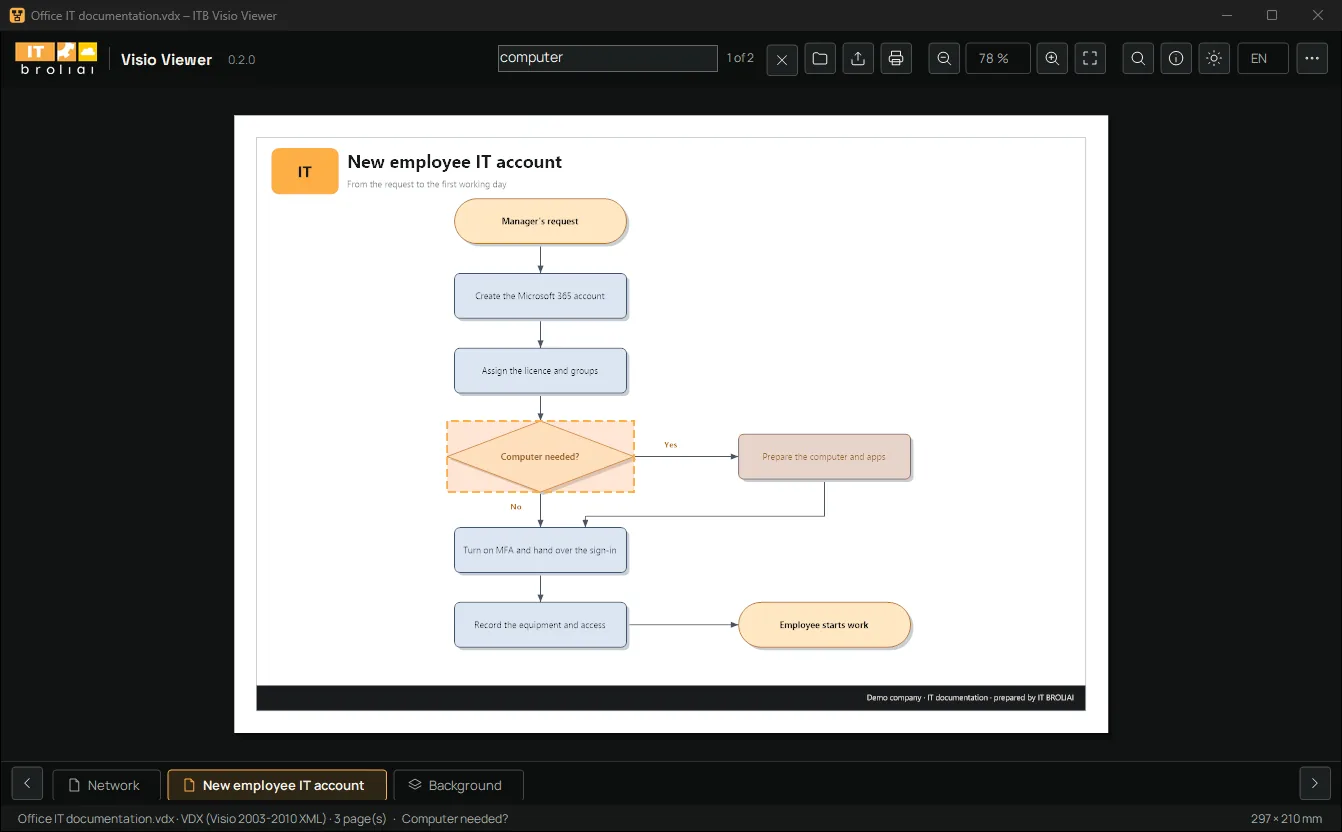
Search across pages
Ctrl+F and the word computer: the app finds two shapes, selects the first and marks the other in amber.
FEATURES
What ITB Visio Viewer does
Every Visio format. Binary .vsd files from Visio 2000, 2002, 2003, 2007 and 2010, XML .vdx files, and .vsdx files from Visio 2013, 2016, 2019, 2021 and Microsoft 365. Stencils and templates open too, and macros in .vsdm files are never run.
The drawing as Visio drew it. The app draws shapes, groups and master shapes, styles and Visio 2013+ themes with their gradients, line patterns and arrowheads, fills, shadows, pictures and background pages. Hidden layers stay hidden.
Easy viewing. Pages sit as tabs at the bottom of the window. Drag the drawing with the mouse, zoom with Ctrl and the mouse wheel, and press 0 to see the whole page again.
Shape data. Click a shape and the side panel shows its name, master, size, text, shape data and hyperlinks. This helps with network, floor and equipment diagrams that keep IP addresses, asset numbers or owners on their shapes.
Search. Ctrl+F finds shapes by their text, shape data or name on every page and shows them in the drawing.
Export and printing. Save a page as PNG (200 dpi) or EMF. EMF is a vector picture, so it stays sharp at any size in Word and PowerPoint. All pages can be saved as PNG files in one go, and Ctrl+C copies the page. When printing, each page is fitted to the sheet in its own orientation.
Installation and updates. The installer sets up the app for your account without administrator rights, adds Start menu and desktop shortcuts and puts the app in Open with for every Visio file type. A new version downloads in the background and installs when you close the app or click Restart.
Interface and a tool for technicians. The interface is available in Lithuanian and English, with dark and light themes. The itbvisio-cli.exe command-line tool prints file details, extracts all text and turns pages into PNG or EMF pictures, a whole folder at a time if needed.
FORMATS
Which files it opens
- .vsd: Visio 2000-2010 drawings in the binary format.
- .vdx: Visio 2003-2010 XML drawings.
- .vsdx: drawings from Visio 2013 and later, including Visio in Microsoft 365.
- .vss, .vst, .vsx, .vtx, .vssx and .vstx: stencils and templates; .vsdm: drawings with macros (the macros are not run).
- Visio 5 (1997) .vsd files do not open. Save them in a newer version of Visio first.
VERSION 0.2.0 · 2026-11-23
Requirements
- Windows 10 or Windows 11, 32-bit or 64-bit.
- .NET Framework 4.8, which Windows 10 and 11 already include.
- The installer needs no administrator rights, and the ZIP only needs extracting.
- Updates need an internet connection. Without one the app works as usual.
- Microsoft Visio and a Visio licence are not needed.
FAQ
Frequently asked questions
Do I need Microsoft Visio or a Visio licence?
No. ITB Visio Viewer reads the Visio file and draws it itself, so you do not need to install Visio or any other program.
Can I edit the drawing?
No, the app is for viewing. You can look at the drawing, search it, save it as a picture and print it, but you cannot change it. The file is opened read-only and never written.
Why does a drawing look slightly different from Visio?
The app shows the values Visio saved in the file and does not recalculate formulas. Most drawings look the same, but corner rounding and some Visio 2013+ theme effects (glow, soft shadows, 3-D) are not drawn. Embedded Excel or Word objects show as a grey box when the file holds no picture of them.
How do I save a drawing as PDF?
Print it and choose the Microsoft Print to PDF printer. Each page is fitted to the sheet in its own orientation.
How do I open Visio files with a double-click?
The installer adds ITB Visio Viewer to Open with for every Visio file type (in the ZIP version the app's ⋯ menu does it). Right-click a Visio file, choose Open with and ITB Visio Viewer, and tick the option to always use this app for that file type. Windows lets only the user choose the default program, so ITB Visio Viewer does not change it.
How does the app update?
A few seconds after it starts, the app asks itbroliai.lt whether a newer version exists and downloads it in the background. A message with a Restart button then appears at the top of the window: click it to update at once, or the new version installs when you close the app. The installed and the ZIP versions both update this way.
Why does Windows show a warning when I start the app?
The app is not yet digitally signed, so Windows SmartScreen may show a warning. Click More info and then Run anyway. You can check the integrity of the downloaded file against the SHA-256 checksum on this page.
Does the app send drawings anywhere?
No. Drawings are read on your computer only. The app goes online only for updates: it asks itbroliai.lt whether a newer version exists and downloads it. The settings and recent files list are kept in %APPDATA%\ITBVisioViewer\settings.ini.
How do I uninstall the app?
Remove ITB Visio Viewer in the Windows settings where installed apps are managed. The shortcuts, the Open with entry and the app's logs go with it. For the ZIP version, delete its folder.
What if a drawing does not open or looks wrong?
If you can share the file, send it or a similar example to us together with the app's log (the ⋯ menu, Open the log folder). From them we will find the cause and fix the app.